From an academic, for academics
Supervise every student without chasing anyone.
A shared board for thesis and project supervision. Students comment from a link. Cards move when you approve.
Free. No password.
Capstone: Sinhala–English code-switching
Shared by Dr. Nimali Fernando
Problem statement
Supervisor approval
Annotation guidelines
Choose the metric
Report draft
Ishara asks to move a card
Annotation guidelines → Writing
Dr. Fernando · 2 days ago
Compute the kappa before you annotate more.
“I kept losing track of which feedback a student had acted on, and who had gone quiet. Asking every student to make another account never worked. So I built the board I wanted.”
An academic who supervises student projects
Three steps
-
Thesis
Project
Blank
1
Pick a template
Milestones and a feedback list, ready to go.
-
app.zayogi.com/g/x7Kp9…CopyIIshara KKavindu MMaya
2
Send each student a link
No signup. They add their name and they are in.
-
Move request
Report draft
Methodology→Writing
ApproveDecline3
Approve what counts
Students ask. You decide.
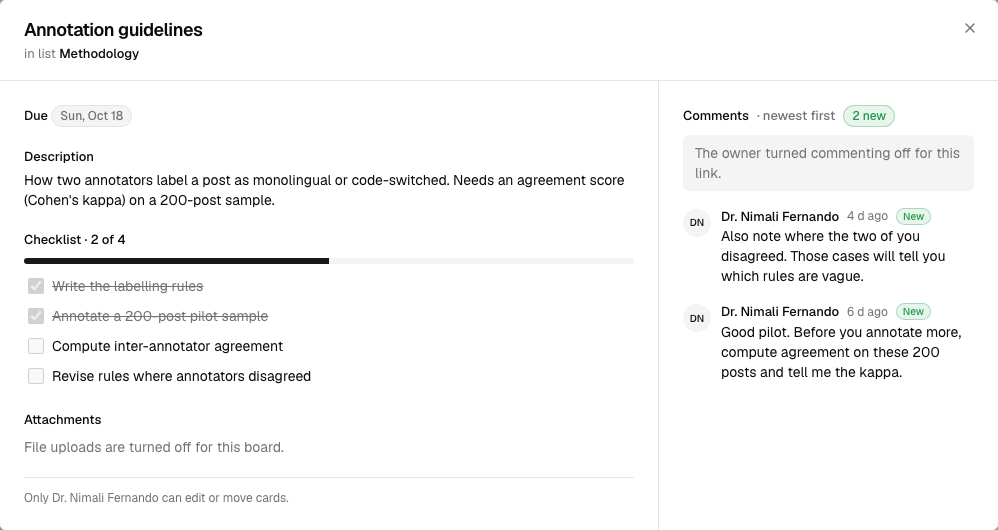
Feedback that gets followed up
Move each point to Done once the student has acted on it.
No accounts for students
A link and a name is all they need.
One board per student
All your students on one home page.
You hold the keys
Only you can edit or move cards.
You decide who sees each board
Private by default. Only people with a link, or on the board, can see one.
One link per student. Turn one off and it stops working at once, revealing nothing.
Uploads are off until you switch them on for a link.
Nobody can pose as you. A name that matches a board member is refused.
Start from a ready-made board
Questions supervisors ask
Do students need an account?
No. They open their link and enter a name. That is all it takes to comment, tick checklist items and request a move.
Can a student change my board?
No. Only you can edit or move cards. A student can ask for a card to move, and the request waits until you approve or decline it.
What if a link gets shared with someone else?
Turn that link off and it stops working straight away. Each student can have their own link, so switching one off does not affect the others.
Can students upload files?
Only if you switch it on for that link. Uploads are off by default.
Free today
Set up your first student in minutes.
- ✓ Unlimited boards
- ✓ Unlimited cards
- ✓ Unlimited guests